You’ve probably run into this already: the drawings show one thing, the specs say something else, and the subcontractor is waiting on an answer before they can move. That gap, whether it’s a missing detail, a conflict between documents, or an unforeseen site condition, is exactly what the RFI process exists to handle.
An RFI (Request for Information) is the formal mechanism GCs use to get official, documented answers from the design team. It’s clarification only. It doesn’t authorize new work, doesn’t modify scope, and isn’t a change order. That distinction matters more than most teams give it credit for.
What an RFI Actually Does in the Project Record
Construction agreements, drawings, and specifications almost never cover every detail of the work. When a gap shows up, the RFI creates a documented record of the question and the answer, one that stays with the project permanently. That paper trail is what protects the GC if a dispute arises later over who knew what and when.
The RFI meaning in construction is simple on paper. In practice, it’s one of the more consequential administrative tools on a job, because an unanswered or poorly tracked RFI can stall a trade, create rework, or expose the GC to cost claims they didn’t budget for.
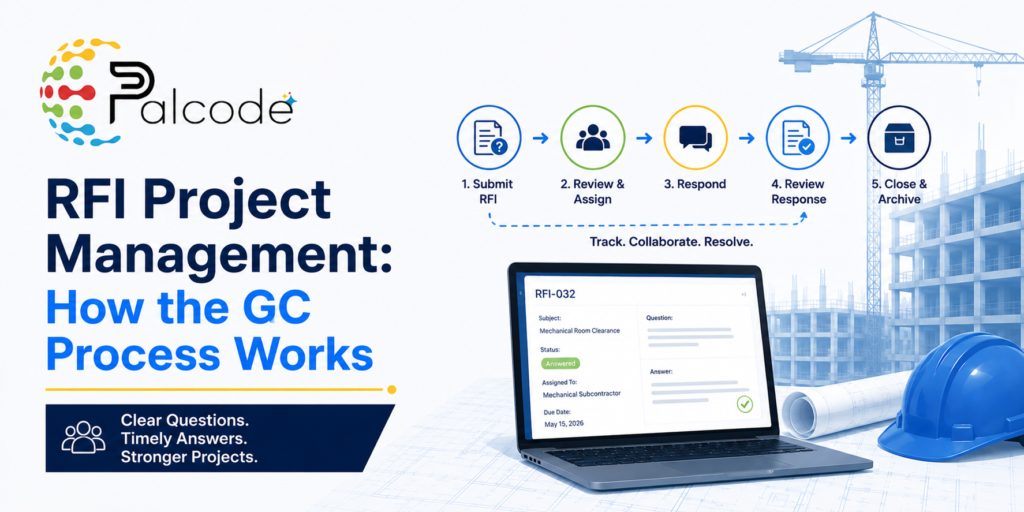
The RFI Process in Construction: Step by Step
Step 1: Identify and Verify the Gap
Before writing anything, the GC or subcontractor needs to confirm the answer isn’t already in the documents. That due diligence step gets skipped more often than it should, and submitting an RFI for something that’s addressed on sheet A3.2 wastes everyone’s time and damages credibility with the design team.
The gap that justifies an RFI is usually one of three things: missing information, a direct conflict between two documents, or an unforeseen site condition that the drawings couldn’t have anticipated.
Step 2: Draft the RFI
A well-drafted RFI includes the project name, a sequential RFI number, and the date. It references the specific drawing sheet or specification section at issue, not a vague description of the problem. The single most common drafting mistake is bundling multiple questions into one RFI. One topic per RFI keeps responses faster and the record cleaner.
A proposed solution, if the GC has one, is worth including. It gives the design team something concrete to react to rather than asking them to solve the problem from scratch. Supporting visuals, a photo of the condition or a marked-up plan, speed resolution significantly. The RFI should also specify a response deadline as an actual date, not “ASAP.”
Step 3: Submit Through the Right Channel
The GC submits the RFI to the architect, engineer, or relevant consultant, often routing through a construction manager or owner’s representative depending on the contract structure. The moment it goes out, it gets logged in the project’s RFI tracking system. That log is the only thing preventing RFIs from falling through the cracks on a busy project.
This is where RFI software for construction earns its place in a GC’s workflow, since a centralized log with status visibility removes a significant amount of manual follow-up.
Step 4: Design Team Review
The architect reviews the RFI and coordinates with relevant consultants, structural, mechanical, electrical, or otherwise, before issuing a written response. Contracts typically specify a 6 to 10 day response window. The average across projects tends to land around 8 days, though complex jobs or RFIs that touch multiple consultants can run longer.
If the design team can’t answer immediately, the RFI routes to an engineer, the client, or a specialist. That’s normal. What’s not acceptable is the RFI going silent with no status update.
Step 5: Log the Response and Close It Out
Once the GC receives the response, it gets logged against the original RFI, and work proceeds based on the clarification. If the response is unclear or doesn’t fully resolve the issue, the GC can revise and resubmit. Every RFI needs to reach a satisfactorily closed status, and the entire team needs access to the answer, not just the person who submitted the request.
That last part is the part most teams underestimate. An RFI answered in an email thread that three people can’t find is functionally the same as an unanswered RFI.
Common Pitfalls in RFI Project Management
The mechanics of the RFI process aren’t complicated. The execution is where projects lose time and money. A few patterns show up repeatedly on jobs that struggle with RFI management:
- Submitting too late, after the affected work has already started or been detailed incorrectly
- Writing vague questions without drawing references, which forces the design team to investigate before they can even begin answering
- Grouping multiple issues into one RFI to save time, which almost always slows the response
- Tracking RFIs in a shared spreadsheet with no version control or status visibility
- Closing out RFIs without distributing the response to affected subs
None of these are exotic failure modes. They happen on well-run projects with experienced teams, usually because the RFI process is treated as administrative overhead rather than a live document control function.
How AI Is Changing RFI Workflows
Manually tracking RFIs across a 200-item log is genuinely tedious work, and the volume on large projects makes it easy for items to age past their response deadlines without anyone noticing. That’s where automation is starting to make a real difference.
AI-assisted RFI management can flag overdue responses, route follow-ups automatically, and surface related RFIs that might affect the same scope. Some platforms are moving toward extracting potential RFI triggers directly from drawing sets, identifying conflicts or missing details before a sub even raises the question. That’s still maturing as a capability, but the early adoption reality is that GCs are getting measurable time savings on log management and follow-up, even if the AI-generated draft RFI still needs human review before it goes out.
The more grounded near-term value is in document control, keeping the full RFI record organized, accessible, and tied to the right drawing revisions. That alone closes a gap that costs teams real hours each week. For a deeper look at how AI and manual approaches compare on this specific workflow, the breakdown on AI RFI management vs. manual tracking is worth reading before you evaluate any tooling.
RFI Best Practices That Actually Hold Up in the Field
Submit early. The moment a gap is identified and confirmed as a real issue, the RFI should go out. Waiting to batch questions or hoping the answer will emerge from the next drawing revision is how RFIs end up on the critical path.
Include visuals whenever the condition is at all spatial or site-specific. A photo or a marked-up plan view cuts the back-and-forth that drags average response time past that 8-day benchmark.
Keep the tracking log current and shared. The RFI log only works as a project management tool if the status reflects reality. An item that shows “submitted” when it’s actually been verbally resolved, or “closed” when the sub hasn’t seen the answer yet, creates downstream confusion that nobody has time to untangle mid-project.
Frequently Asked Questions
How long does it take to get an RFI answered in construction?
Most contracts specify a 6 to 10 day response window, and the average across projects tends to run about 8 days. That said, RFIs involving multiple consultants, like a question that touches both structural and MEP, often take longer because the architect needs to coordinate before issuing a response.
What’s the difference between an RFI and a change order?
An RFI is a request for clarification only. It asks a question about existing contract documents but doesn’t authorize new work or modify the contract scope. A change order actually changes what’s being built or what it costs. Confusing the two is a common source of disputes, especially when a sub believes an RFI response implied approval for additional work.
What does RFI software typically cost, and is it worth it for smaller GCs?
Entry-level RFI and project documentation tools often run anywhere from a few hundred to a few thousand dollars per month depending on project volume and the broader platform they’re part of. For smaller GCs managing a handful of active projects, a standalone RFI module inside a project management platform is usually more cost-effective than a full enterprise suite. The real question is whether the manual follow-up and log management you’re doing now is costing you more in hours than the software would.
Can a subcontractor submit an RFI directly, or does it have to go through the GC?
In most contract structures, the GC is the party with a direct contractual relationship with the design team, so RFIs typically flow from sub to GC, then GC to architect. Some projects allow subs to submit directly with GC review and approval. Either way, the GC should be logging and tracking every RFI regardless of who initiates it, since the responses affect scope and schedule across the job.
What happens if the design team doesn’t respond to an RFI within the contract deadline?
An unanswered RFI past the contractual deadline is a documented event, which is exactly why the log matters. The GC can use that record to support a claim for schedule impact or additional cost if the delay affects work. In practice, a formal follow-up referencing the original submission date and the contract’s response window usually gets faster results than escalating immediately.
See How Palcode.ai Handles the Document Control Side of RFI Management
If your team is spending real hours each week chasing RFI responses, updating logs, and making sure subs have the latest answers, Palcode.ai is worth a closer look. The platform is built for GCs and preconstruction teams who need document workflows that actually stay current without manual overhead. Book a demo call to see how it fits your process.