Most construction delays don’t start on the jobsite. They start weeks before mobilization — someone’s still chasing insurance certificates, a trade’s scope isn’t confirmed yet, or two subs get booked against each other on the same day without anyone noticing. By the time a crew shows up, it’s already too late to fix cheap.
That’s the problem automated scheduling tools for subcontractor coordination solve. Not speed for its own sake. Real control over the front end of a project, before the first shovel moves.
Why Coordination Breaks Down in Preconstruction
Traditional subcontractor coordination runs on phone calls, email threads, and a spreadsheet someone updates by hand. Fine when a project’s small and you know every sub personally. Falls apart once you’ve got multiple trades, overlapping deadlines, and a dozen compliance items running at the same time.
The handoffs are where it breaks. Confirming scope, collecting documents, verifying insurance, checking schedule dependencies — none of these are hard tasks by themselves. Chase all of them by hand, across a whole team, with nowhere central to check status, and it piles up fast. Miss one item and it’s not just that sub who slows down. The whole sequence can slip, and that gets expensive once crews are already on site.
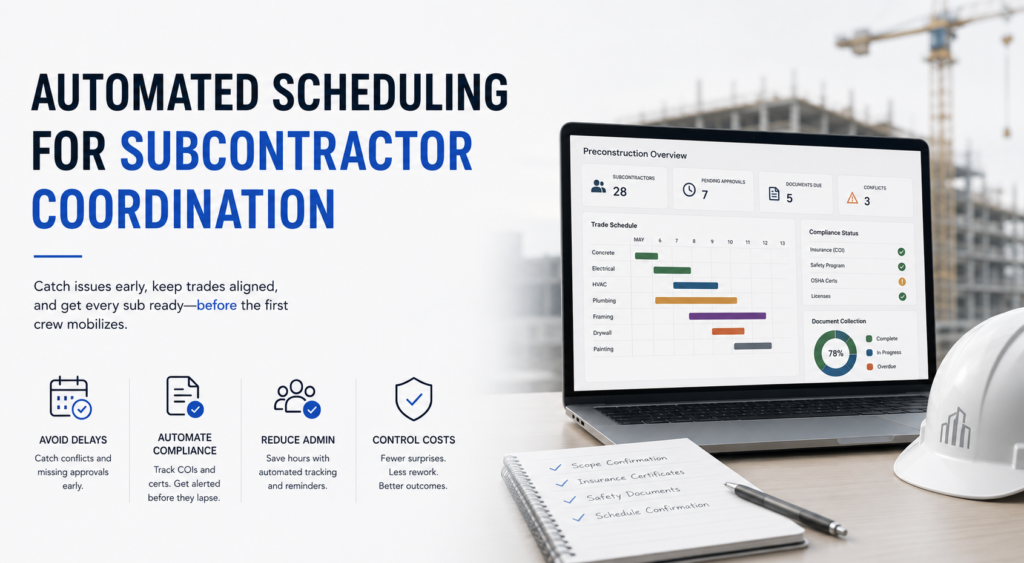
Automation swaps the manual chase for one system: assignments, dependency alerts, compliance tracking, status, all in the same place. Problems get caught and resolved before crews get sent out. Not after they’ve shown up and someone’s scrambling.
The Concrete Benefits Automated Scheduling Tools Deliver
Delays Get Caught Earlier
Automated coordination surfaces trade conflicts, missing approvals, and dependency issues before they become standdowns. Most teams miss this part: the real value isn’t speed. It’s catching things while the fix is still cheap. A conflict that hits in the field means idle labor and rescheduling costs. Catch it in preconstruction, and it’s a ten-minute phone call, nothing more.
Significantly Less Admin Time
Manual document tracking is slow. One source in the research found tracking a single document by hand can run 10 to 15 minutes, while AI-assisted coordination cuts that to under 60 seconds. Multiply that across a mid-size project’s full document set and the time savings turn into real budget savings. Project managers and superintendents get hours back. Not minutes.
Tighter Compliance Control
A missing COI or a lapsed safety certification can stop a sub from starting on time. Manual tracking usually catches that gap on mobilization day, right when nobody wants surprises. Automated compliance monitoring tracks certificate status and sends reminders on its own, so the team knows about a gap weeks ahead instead of hours.
Worth a look if you’re still building out your subcontractor prequalification checklist, since compliance tracking and prequalification data usually end up living in the same workflow once automation’s in place.
Less Rework, Fewer Invoice Disputes
Document scope confirmations, sequencing calls, and approvals centrally, and teams stop working off outdated instructions. Less rework happens. Fewer disputes follow it too, since there’s a record of what got confirmed, when, and by who. That paper trail is one of the clearest gaps between automated and manual coordination.
Better Cost Control Before the Budget Moves
Idle crews cost money. So does rescheduling. Both usually trace back to weak preconstruction coordination. Industry reporting keeps showing contractors on subcontractor management tech reporting better productivity and lower costs — exact numbers shift by project type and setup, but the direction holds.
Faster Mobilization
Streamline onboarding and document collection, and you shrink the gap between picking a sub and giving them their first assignment. Less prep time before things start. That’s a direct schedule win, and on longer projects it compounds since a late mobilization pushes every milestone after it.
What Effective Subcontractor Coordination Automation Actually Covers
Platforms don’t all handle the same functions—scope shifts a lot from one to the next. A genuinely useful system usually centralizes at least these:
- Scheduling and dependency tracking across trades
- Automated reminders for approvals and document submissions
- Insurance and compliance certificate monitoring
- Document collection with version control
- Progress dashboards with escalation workflows
Put those functions in one workflow instead of scattered across email, phone, and spreadsheets, and the team actually gets a readiness picture before mobilization. Not five different status updates from five different sources.
Preconstruction Is When Fixes Are Still Cheap
You’ve probably lived this: a sub shows up day one without a required certification, and the whole morning turns into a scramble. Fixing it takes an hour. The idle labor while you sort it out costs a lot more than that hour.
That’s the whole case for doing this work in preconstruction. Catch an issue before mobilization and it costs time. Catch it after and it costs time, money, and usually drags a few downstream trades into the mess too.
Doesn’t matter if it’s a compliance gap, a scope overlap, or a scheduling conflict — same logic applies. Automated scheduling tools aren’t valuable because they’re faster. They’re valuable because they move problem-solving to the point where fixing things is still cheap.
Where Adoption Is Headed
AI-assisted coordination is turning into table stakes in commercial construction, at least among GCs. More teams are pulling document collection, compliance tracking, and scheduling dependencies into one platform instead of duct-taping point solutions together.
Still, adoption’s uneven. Plenty of smaller GC teams run this by hand, either because the tools feel like overkill to set up or because nobody’s formally looked at the preconstruction workflow yet. The real question isn’t whether automation works in theory. It’s whether your current setup is causing the friction automation actually fixes — missed compliance items, late confirmations, schedule conflicts nobody catches until crews are already on site.
If that’s your situation, the payoff shows up fast. Usually inside the first project run through a fully automated preconstruction setup.