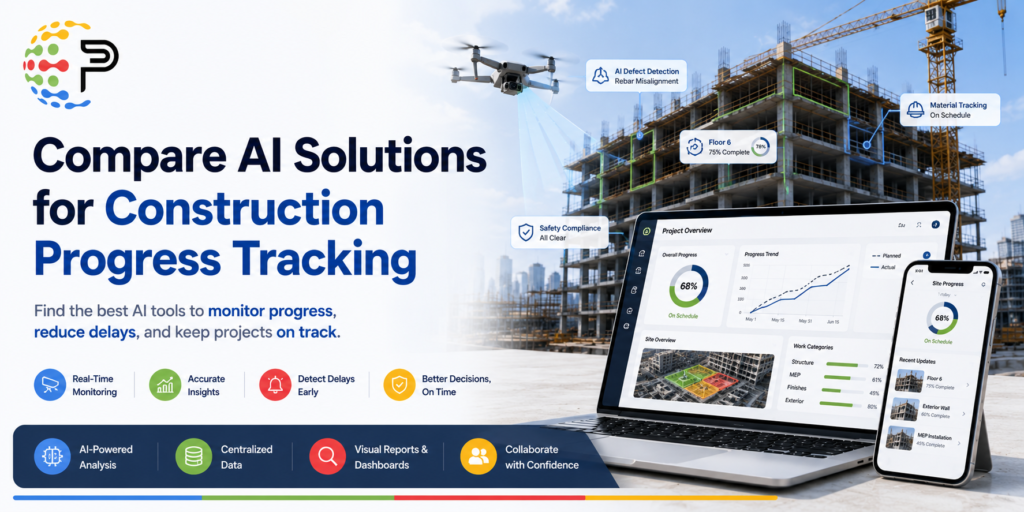
You’ve probably already decided that manual walkthroughs aren’t cutting it. Every platform in this category claims real-time visibility and early delay detection, so the harder question is which one fits your workflow, your project scale, and your actual field conditions. This breakdown assumes you’re past the “should we adopt AI progress tracking” stage and are now asking which platform is worth the contract.
How the Best AI Jobsite Progress Tracking Platforms Actually Work
Every platform worth evaluating runs on the same three-stage pipeline: capture, classify, report. What separates them is where they excel within that pipeline and what they demand from your team along the way.
Capture happens via 360° helmet cameras, mobile photo apps, drones, or laser scanning depending on the platform. The AI layer then analyzes those images to identify materials, MEP components, and structural elements, mapping outputs to your schedule or BIM model. Deviation alerts, heatmaps, and S-curves are generated automatically at the report stage.
That’s the theory. In practice, platforms that bolt AI onto a general-purpose project management tool (Procore or Autodesk Build, for example) deliver real value, but they’re augmenting existing workflows rather than automating the full pipeline. That distinction matters when you’re evaluating what you actually get out of the box versus what requires significant configuration work.
Where AI Progress Tracking Outperforms Manual Methods
The gap is bigger than most teams expect. Manual walkthroughs typically surface delays when a project is 40 to 50% complete. Purpose-built AI platforms flag the same productivity issues as early as 10% completion. Catching a structural or MEP deviation that much earlier changes what recovery options you actually have.
A few other dimensions where the gap shows up on real jobs:
- Manual accuracy varies by observer and fatigue. AI tracking covers 700+ visual components with consistent readings every cycle, regardless of who’s on site that week.
- AI platforms deliver a weekly cadence with 24 to 48-hour turnaround as a baseline. Manual tracking compresses during crunch periods, precisely when you most need the data.
- Time-stamped, location-mapped visual records hold up in payment disputes. Manual field notes often lack the location context or date specificity that actually matters in a claim.
That last point is the one most teams underestimate until they’re actually sitting across from an owner in a dispute.
Read More : Compare AI Solutions for Construction Progress Tracking
Compare AI Solutions for Automatic Construction Progress Tracking: Key Players
The platforms below represent a realistic shortlist for commercial GCs evaluating automated progress reporting. They differ meaningfully on capture method, accuracy profile, price tier, and the type of project they’re genuinely built for.
Buildots
Buildots uses 360° helmet cameras and compares captured imagery directly against BIM models to calculate per-trade, per-zone completion rates. It’s purpose-built for construction and delivers high accuracy on complex commercial projects. The tradeoff is price: premium tier, and not mobile-first. Smaller teams or those without mature BIM adoption tend to find the setup curve steeper than the demos suggest.
OpenSpace
OpenSpace layers expert human review on top of AI image analysis to produce verified progress reports. That human review layer is what makes it defensible in payment disputes and owner-facing reporting. It’s also premium-priced and not mobile-first. If documentation integrity for billing and inspections is your primary driver, this is the option most likely to earn trust from owners who are skeptical of a raw AI-generated percentage.
Banamind
Banamind is the clearest mobile-first option in this category, built specifically for GCC project workflows. Field teams use a structured photo capture app to map images to work packages, and the platform calculates zone-level completion percentages automatically. Pricing starts around $500/month, which puts it in the mid-market tier and makes it viable for projects where a premium platform’s cost structure simply doesn’t pencil out. It won’t give you the BIM alignment depth of Buildots, but for teams that need fast, field-driven capture without dedicated hardware, it’s a realistic fit.
Cupix
Cupix offers a cloud-based digital twin environment with strong BIM overlay capabilities and schedule alignment. It sits at a competitive price point relative to Buildots and OpenSpace while maintaining accurate site-to-model comparison. Teams already invested in cloud-based project delivery who want BIM integration without the premium tier cost should put this one on the shortlist.
DroneDeploy
DroneDeploy is the natural choice if drone imagery is already part of your site workflow. It processes visual intelligence for both progress tracking and safety monitoring, and it sits in the mid-market tier. The limitation is straightforward: if your site doesn’t support regular drone flights (urban infill, tight footprint, restricted airspace), it’s the wrong fit regardless of price.
Doxel and Track3D
Doxel combines 360° capture with laser scanning to deliver component-level and system-level schedule breakdowns. It’s the most granular option in this group, but it’s premium-priced and carries real capture overhead. Track3D emphasizes real-time dashboards and quantification for stakeholder reporting. Both serve specific use cases well, but neither is the right starting point for a team new to automated progress tracking.
How to Actually Choose Between These Platforms
The buying decision usually comes down to two things: how your field team captures data, and what you need the output to do downstream.
If your superintendent isn’t going to wear a 360° helmet camera consistently, a platform built around that capture method will underperform regardless of its AI accuracy. Capture compliance is the variable most teams underestimate when they’re evaluating demos. A mobile photo workflow like Banamind’s is lower-fidelity but far more likely to generate consistent data from real crews on real schedules.
For teams with mature BIM adoption on large commercial projects, Buildots or Cupix will give you alignment depth that mobile-first platforms can’t match. For payment dispute protection and owner reporting, OpenSpace’s verified output carries weight that pure AI percentage calculations sometimes don’t, and that distinction is worth paying for on high-stakes jobs.
Price tier is a real constraint. Premium platforms justify their cost on large, complex projects with significant schedule risk. The math on a $20M multifamily project looks different than on a $150M mixed-use job, and the AI tools buyer’s guide for construction framework of matching tool complexity to project scale applies directly here.
Where This Category Is Heading
Most GCs are still in early evaluation mode on AI jobsite progress tracking. The platforms are maturing faster than procurement cycles. What’s shifted over the last 18 months is that output from purpose-built platforms is now defensible in owner conversations and dispute contexts, not just useful internally.
The next wave of adoption pressure will come from owners and lenders who want objective progress data as a condition of draw approvals. When that becomes standard on institutional projects, teams that have already operationalized automated progress reporting will have a real advantage over those still reconciling superintendent walk notes with schedule updates.
| Platform | Capture Method | Core AI Feature | Price Tier | Mobile-First | Best Fit |
|---|---|---|---|---|---|
| Banamind | Mobile photo capture | Progress % per zone, deviation alerts | Mid-market (~$500/mo) | Yes | GCC workflows, field-driven teams |
| Buildots | 360° helmet cameras | Per-trade, per-zone completion vs. BIM | Premium | No | Large commercial, mature BIM adoption |
| OpenSpace | 360° helmet cameras | AI plus human-verified progress reports | Premium | No | Payment disputes, owner-facing reporting |
| Cupix | 360° capture plus cloud twin | BIM overlay, schedule alignment | Competitive | No | Cloud delivery teams, BIM integration |
| DroneDeploy | Drone imagery | Visual intelligence for progress and safety | Mid-market | No | Drone-ready sites, safety monitoring |
| Doxel | 360° plus laser scanning | Component and system-level schedule breakdown | Premium | No | Granular component tracking |
| Track3D | Visual data plus AI | Real-time dashboards, quantification | Mid-market | No | Stakeholder reporting, real-time visibility |
Frequently Asked Questions
How early can AI progress tracking software actually detect a schedule delay?
Purpose-built AI platforms can flag productivity issues at roughly 10% project completion. Manual methods typically surface the same delays at 40 to 50% completion, by which point recovery options are far more limited. On a typical commercial project, that’s weeks of lead time you’re either capturing or losing.
What does AI construction progress monitoring software cost?
Mid-market platforms like Banamind start around $500 per month. Premium platforms, including Buildots, OpenSpace, and Doxel, carry higher price points suited to large commercial projects where schedule risk justifies the spend. The cost gap between tiers is significant enough that project size should drive the tier decision, not feature preference alone.
Do field crews need special hardware to use these platforms?
It depends on the platform. Buildots and OpenSpace require 360° helmet cameras, which adds hardware cost and depends entirely on consistent crew adoption. Banamind uses a standard mobile app for photo capture, which tends to see higher field compliance in practice. If your crew won’t wear the hardware reliably, the AI accuracy behind it won’t matter.
Can AI-generated progress reports hold up in a payment dispute?
OpenSpace’s hybrid model, which layers expert human review on top of AI analysis, is specifically designed to produce reports that survive owner scrutiny. Pure AI percentage outputs from other platforms are increasingly accepted for internal scheduling use, but the human-verified layer makes a real difference when a payment claim is on the line.
How long does it take to get a team operational on one of these platforms?
Mobile-first platforms with simple photo capture workflows can be running in a matter of days. BIM-integrated platforms like Buildots require model preparation and alignment work upfront, which usually adds several weeks to onboarding. Teams without an established BIM workflow should factor that prerequisite into the timeline before committing to a premium platform.
See How AI-Powered Preconstruction Tools Fit Into Your Workflow
If AI progress tracking is one part of a broader push to reduce manual effort across preconstruction, Palcode.ai is worth a closer look. The platform helps GCs and estimating teams automate bid leveling, scope sheet generation, and budget integration, so the time your team saves on bid review compounds with the time saved on site documentation. Book a demo call to walk through how it fits your current process. Book a Demo
About the Author
Shikha is a Senior Product Growth Marketer at palcode.ai, where she focuses on driving product adoption and improving user engagement through strategic, data-driven marketing. She contributes to product growth initiatives through market research, user behavior analysis, growth experimentation, and the development of best practices that help teams improve customer experience and product performance. Her work focuses on turning complex product concepts into actionable insights that support adoption, retention, and long-term growth. Explore More Blogs Here.