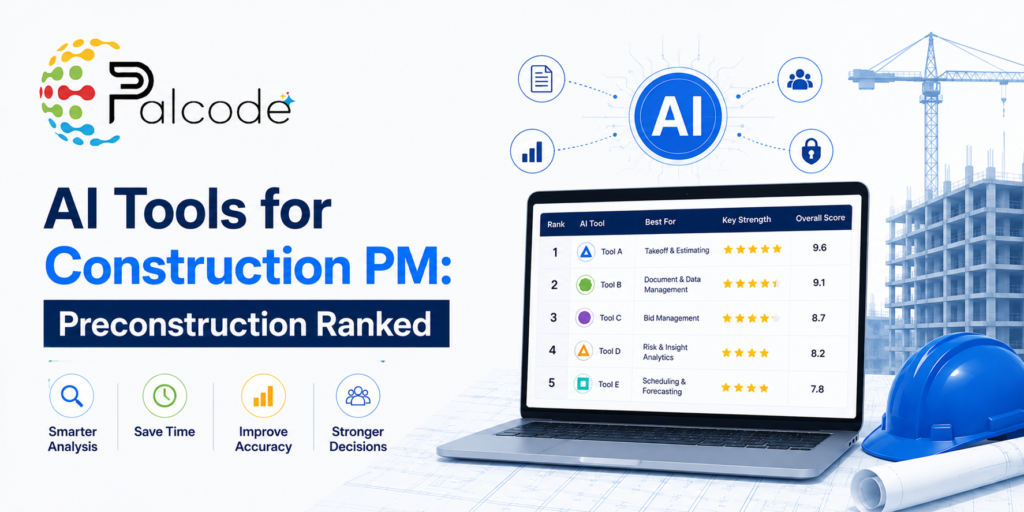
You’ve probably already seen the long lists. Ten tools, each with a paragraph of marketing copy, and still no clear answer on which one actually handles the messy reality of preconstruction: overlapping bid packages, scope gaps buried deep in a 400-page spec set, schedules that need pressure-testing before a single permit gets pulled. This post skips the survey format and gets to the actual buying comparison. Five AI tools for construction project management, ranked on preconstruction fit, with honest notes on where each one stops being useful.
Why Preconstruction Is the Hardest Place to Deploy AI
Most AI construction tools are built for the construction phase: daily reports, RFI tracking, progress photos. Preconstruction is a different problem. The inputs are unstructured. Think PDFs of drawings and specifications with no consistent format, addenda that get issued mid-bid, and owner-provided data that doesn’t match what the drawings show.
The decisions are also higher-stakes than they look. A missed scope item at bid time doesn’t surface until a sub is standing on site asking who owns the work. That’s the environment these tools are being asked to perform in, and the difference between a purpose-built preconstruction tool and a general-purpose one matters a lot more than vendors usually admit.
AI PM Software for Construction: The Five Tools Worth Comparing
Provision: Best All-in-One for GC Preconstruction
Provision is the only platform built end-to-end for general contractor preconstruction, integrating scope generation, risk identification, and document Q&A into a single tool. That consolidation is its real advantage. Most preconstruction teams currently stitch together two or three point solutions, and the handoff between them is exactly where errors hide.
The bid package creation automation is worth calling out specifically. It’s not just document parsing. Provision handles the full workflow from scope through risk analysis without requiring a separate tool at each step. That’s the part most teams underestimate when they start evaluating. Setup complexity for a unified platform tends to be higher than for a single-purpose tool, so factor onboarding time into your timeline if you’re already mid-cycle on a project.
Downtobid: Best for Bidding and Scope Analysis
Downtobid focuses on the bidding side of preconstruction. It uses AI to automate scope analysis and generate bid packages, and connects to a verified subcontractor network to cut down on manual solicitation work.
Its real strength is speed at the front end of the bid cycle. Automated scope analysis means an estimator isn’t spending two days manually combing a spec book just to build an invitation to bid. The tradeoff is that Downtobid is purpose-built for bidding workflows. If your preconstruction pain lives further downstream, in risk modeling or schedule validation, you’d need another tool alongside it. For teams whose primary bottleneck is bid solicitation and scope extraction, it’s a strong fit for bid package development and outreach efficiency.
Trunk Tools: Best for Document Review with a Free Tier
Trunk Tools offers AI-assisted construction document review, and it’s the only tool on this list with a free tier. That matters for teams that want to test AI on real bid packages before committing a budget line, especially when leadership is skeptical.
The honest limitation: Trunk Tools is built for contract review. It doesn’t cover drawings or specs. So if your document review problem is contract-heavy, it’s a solid specialist. If you need something that can parse a full set including plans and submittals, you’re looking at a different category of tool entirely. The free tier makes it easy to validate the use case before spending anything, which is genuinely useful when you don’t have time to run a full procurement process.
NPlan: Best for Risk Mitigation and Schedule Optimization
NPlan uses machine learning trained on historical project data to generate predictive insights on schedule risk. The core value is catching schedule problems before they’re locked in. Preconstruction is where sequence decisions get made, and those decisions compound. A sequence that looks reasonable on paper can create cascading delays once trade stacking gets factored in.
What makes NPlan specifically useful at the preconstruction stage is that it surfaces those risks before the schedule becomes a baseline, when changes are still cheap. The tradeoff is specialization. It isn’t doing scope analysis or bid management, so it fits best as one layer in a broader preconstruction stack. Teams that don’t have structured historical schedule data should expect lower predictive accuracy early on, at least until the platform has enough project history to work from.
ALICE Technologies: Best for AI-Driven Planning and Forecasting
ALICE Technologies pairs AI and machine learning to help GCs optimize and forecast schedules during the planning phase. It was recognized in the Scheduling category of the 2025 Preconstruction Tech Top 50, which reflects where it actually sits in the market.
The planning optimization is its differentiator. ALICE can model multiple construction sequences and surface the most efficient path. That’s particularly useful on complex projects where the sequencing decision itself carries significant cost implications. It’s not a bid management tool. Teams evaluating it should be clear about whether schedule optimization at the planning stage is their primary unmet need, because that’s the specific problem it was designed to solve, and it’s not trying to be anything broader than that.
Two Specialist Tools Worth Knowing About
The research points to two additional tools that didn’t rank in the top five but are genuinely worth knowing. DocumentCrunch is solid for contract-only review. Togal.AI is the more accurate choice for takeoff work specifically.
The pointed warning that came alongside this: don’t drop a general large language model into a preconstruction workflow and expect construction-grade accuracy. The output quality on scope analysis or risk identification from a general-purpose LLM isn’t comparable to what tools trained on construction data can produce. Teams evaluating AI for construction takeoffs in particular should insist on seeing any tool run against a real project document set before committing budget.
How to Compare These AI Tools on Real Buying Criteria
The tools above differ meaningfully on four dimensions that matter at the purchasing stage.
- Scope of coverage: Provision covers the full preconstruction workflow. Downtobid focuses on bidding. Trunk Tools handles contracts only. NPlan and ALICE are both schedule-focused.
- Setup investment: A free tier like Trunk Tools is fast to test. A unified platform like Provision requires more onboarding time before you see reliable output.
- Data requirements: NPlan’s predictive accuracy improves with historical project data. If your team doesn’t have structured historical schedules, early predictions will be rougher.
- Project complexity: ALICE is built for complex, multi-sequence projects where planning optimization has real cost impact. Smaller GCs running straightforward project types may not see proportional value there.
Where AI for Preconstruction Teams Is Headed
The tools here reflect where the category is right now: mostly purpose-built for one or two preconstruction functions, requiring GCs to assemble a stack rather than rely on a single platform. That’s shifting. Unified preconstruction platforms are getting more capable, and document intelligence is improving quickly as more construction-specific training data becomes available.
Adoption is still uneven. Most preconstruction teams are running at least some AI on document review or takeoff today, but full workflow automation across the preconstruction phase is still rare. The teams building process discipline around these tools now, rather than waiting for a single perfect platform, are already seeing the gap widen between their bid cycles and those of teams still running manual review. That gap tends to compound over time, and it’s already measurable in hours per project.
| Tool | Best For | Preconstruction Scope | Covers Drawings/Specs | Free Tier | Best Fit |
|---|---|---|---|---|---|
| Provision | All-in-one GC preconstruction | Scope, risk, document Q&A | Yes | No | GCs needing a unified preconstruction platform |
| Downtobid | Bidding and scope analysis | Bid packages, subcontractor matching | Yes | No | Teams with bid solicitation as primary bottleneck |
| Trunk Tools | Contract document review | Contracts only | No | Yes | Teams testing AI before budget commitment |
| NPlan | Risk mitigation and scheduling | Schedule risk, predictive insights | No | No | Teams with historical project data and schedule risk focus |
| ALICE Technologies | AI-driven planning and forecasting | Schedule optimization, sequencing | No | No | Complex projects where sequencing decisions carry high cost impact |
Frequently Asked Questions
What’s the difference between AI project management tools built for preconstruction vs. general construction?
General construction PM tools are designed around active project phases: RFIs, daily logs, punch lists. Preconstruction AI needs to handle unstructured inputs like raw PDF drawing sets and specifications, which require document intelligence rather than workflow automation. Tools like Provision and Downtobid are specifically built to extract scope and risk from that kind of input. General-purpose platforms usually can’t match that accuracy on construction documents.
How much do these AI preconstruction tools typically cost?
Trunk Tools offers a confirmed free tier, making it the lowest-risk entry point for teams testing AI for the first time. The other platforms are paid products, and pricing typically reflects the scope of capability. Unified platforms like Provision carry a meaningful investment. Getting a demo and a scoped proposal is usually the fastest path to real pricing numbers.
Can one tool handle the entire preconstruction workflow, or do most teams need multiple tools?
Right now, most preconstruction teams run a stack rather than a single platform. Provision comes closest to covering the full workflow, with scope generation, risk analysis, and document Q&A in one tool. Teams with specialized needs often layer in a specialist like NPlan for schedule risk or Togal.AI for high-volume takeoff on top of whatever primary platform they’re using.
Is it worth switching AI tools mid-bid-cycle, or should teams wait until between projects?
Mid-cycle switches are rarely worth the disruption. Most of these platforms need a few real project document sets processed through them before output becomes reliable enough to act on. Starting at the beginning of a project, with time to validate outputs against known scope before depending on them, produces much better results than a rushed mid-cycle deployment.
Do these tools work with existing estimating and project management software?
Integration depth varies considerably across this category. Some platforms export structured data into common estimating environments. Others operate as standalone tools where output gets manually transferred. Before selecting a platform, confirm specifically how it connects to the estimating or bid management software your team already uses. An isolated AI tool that creates a parallel data entry step can actually slow preconstruction down rather than speed it up.
See How Palcode.ai Handles the Preconstruction Work Your Team Does Every Day
If your team is evaluating AI tools for construction project management and preconstruction is the real bottleneck, Palcode.ai is worth a close look. Palcode.ai is built specifically for GC estimators managing bid leveling, scope sheet generation, and coverage gap detection across complex bid cycles. The best way to see whether it fits your workflow is to run it against a real project. Book a demo call and bring your actual use case.
About the Author
Mohit is the Founder and CEO of Palcode.ai — an AI-powered platform helping general contractors automate preconstruction, sub outreach, and bid management. Before building Palcode, he spent years inside the problem, watching estimators lose weeks to manual follow-ups that software should have handled a long time ago. Explore More Blogs Here.